
When AI recommends your business, you’ll want to know what it says, where it sends people and whether anyone goes...

When AI recommends your business, you’ll want to know what it says, where it sends people and whether anyone goes on to enquire or buy.
You might find that ChatGPT recommends your company but links to a directory instead of your website. Or that an outdated page is still being used to explain your services and prices.
Tracking AI search visibility helps you spot these details and decide what needs attention. Here’s how to combine the tools, check the answers and connect your findings with business results.
Start with four separate measures:
These measures don’t always move together. AI might recommend a dental clinic but link to its directory listing, giving the clinic a mention without a citation to its own website. A construction company’s guide might earn citations without the company being recommended for a project.
Track each separately. The tools below cover different parts of the picture.
For the wider context, our guide to AI search visibility explains how businesses can become easier to find, understand and recommend.
GA4 shows identifiable website visits and conversions. Search Console reports Google visibility, while Bing and Clarity provide citation and query insights. Semrush lets you track selected prompts over time.
Together with manual checks, they help you understand both what AI says about your business and what happens when people reach your website.
Google Analytics 4, or GA4, shows where website visitors come from and what they do next.
To begin, open Reports → Acquisition → Traffic acquisition, select Session default channel group and look for AI Assistant. This groups recognised visits from AI assistants. Use Session source / medium to inspect the identifiable sources behind those visits.
A custom channel group gives you control over which sources you include. Google explains how its default channel groups classify traffic.
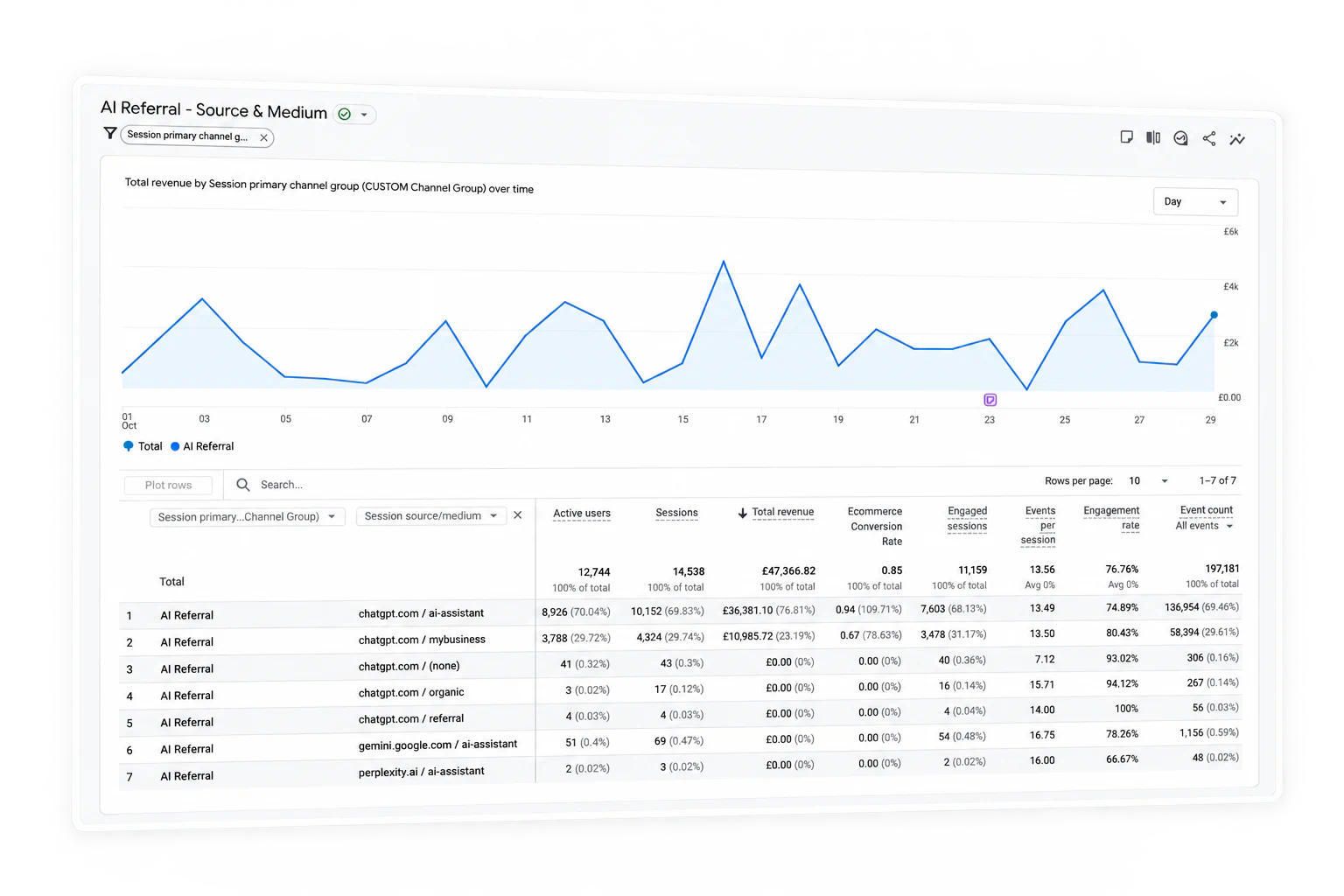
With the relevant events tracked, review landing pages, completed enquiry forms, appointment requests and purchases. Count a click on “Request a quote” separately from a successfully submitted enquiry.
If appointments or payments happen on another domain, check that tracking continues across the journey. Where source information reaches your CRM, review which enquiries became qualified leads or customers.
Google’s AI Overviews and AI Mode remain within Organic Search. A custom channel won’t separate those visits from ordinary Google search clicks.
Some AI influence will also remain difficult to identify. Someone might discover your business through an assistant and return later by searching your name.
Our guide to getting more from GA4 covers the wider reporting foundations.
Google Search Console shows the searches your website appears for, alongside impressions and clicks.
Look for themes relevant to your services and locations. For a construction company in Birmingham, these might include commercial refurbishments, project timescales and contractor accreditations. Use them to develop prompts worth investigating in AI tools.
The Generative AI performance report provides impressions for links shown in AI Overviews and AI Mode, with breakdowns by page, country, device and date. It may be absent when there isn’t enough qualifying activity. Google’s documentation explains its coverage.
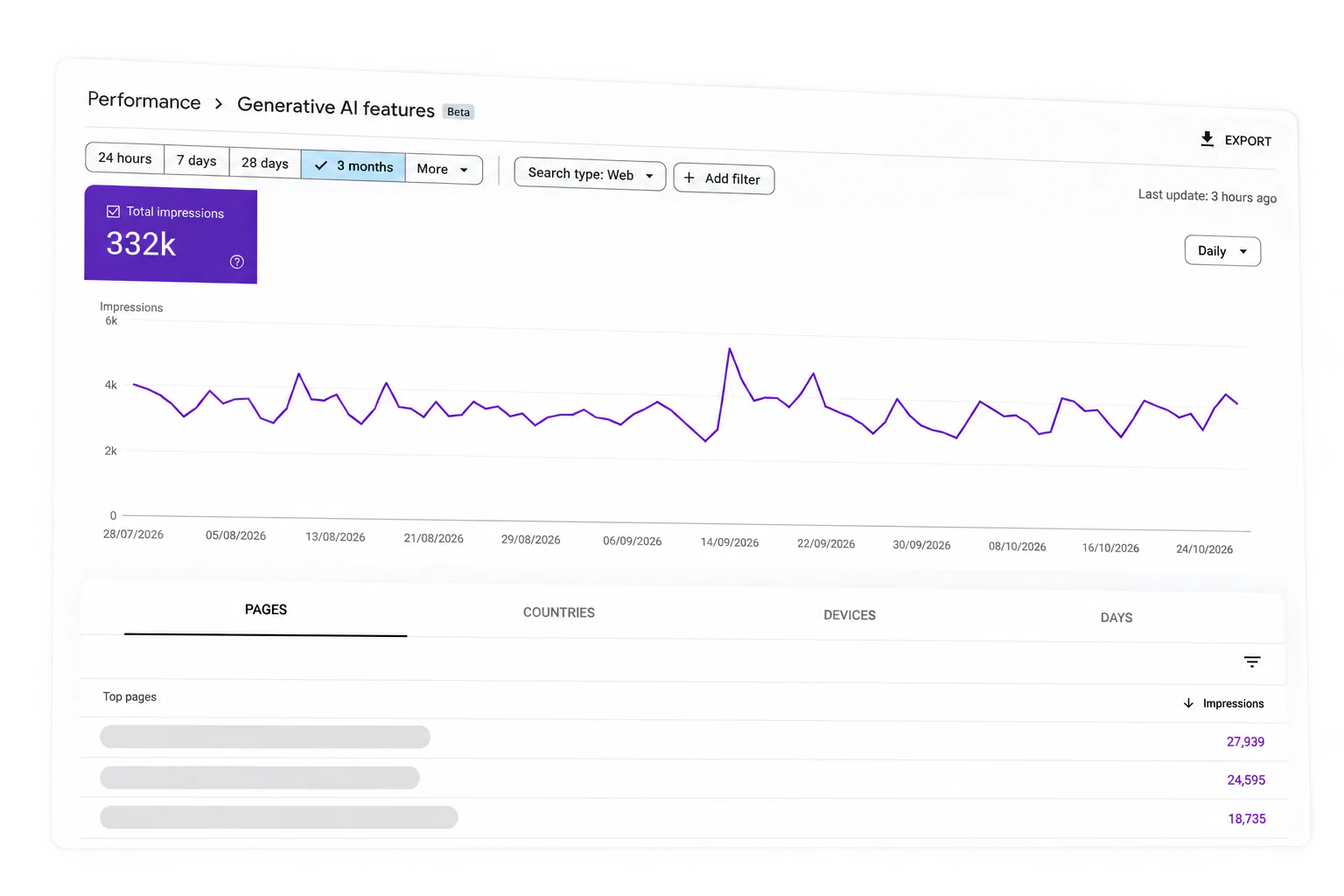
Check which pages appear. If an old service page is attracting attention, review its information and give visitors a clear next step.
A query appearing in Search Console’s ordinary search data doesn’t prove that an AI answer was shown.
Bing’s AI Performance report shows citation activity across Microsoft Copilot, Bing’s AI summaries and selected partner experiences.
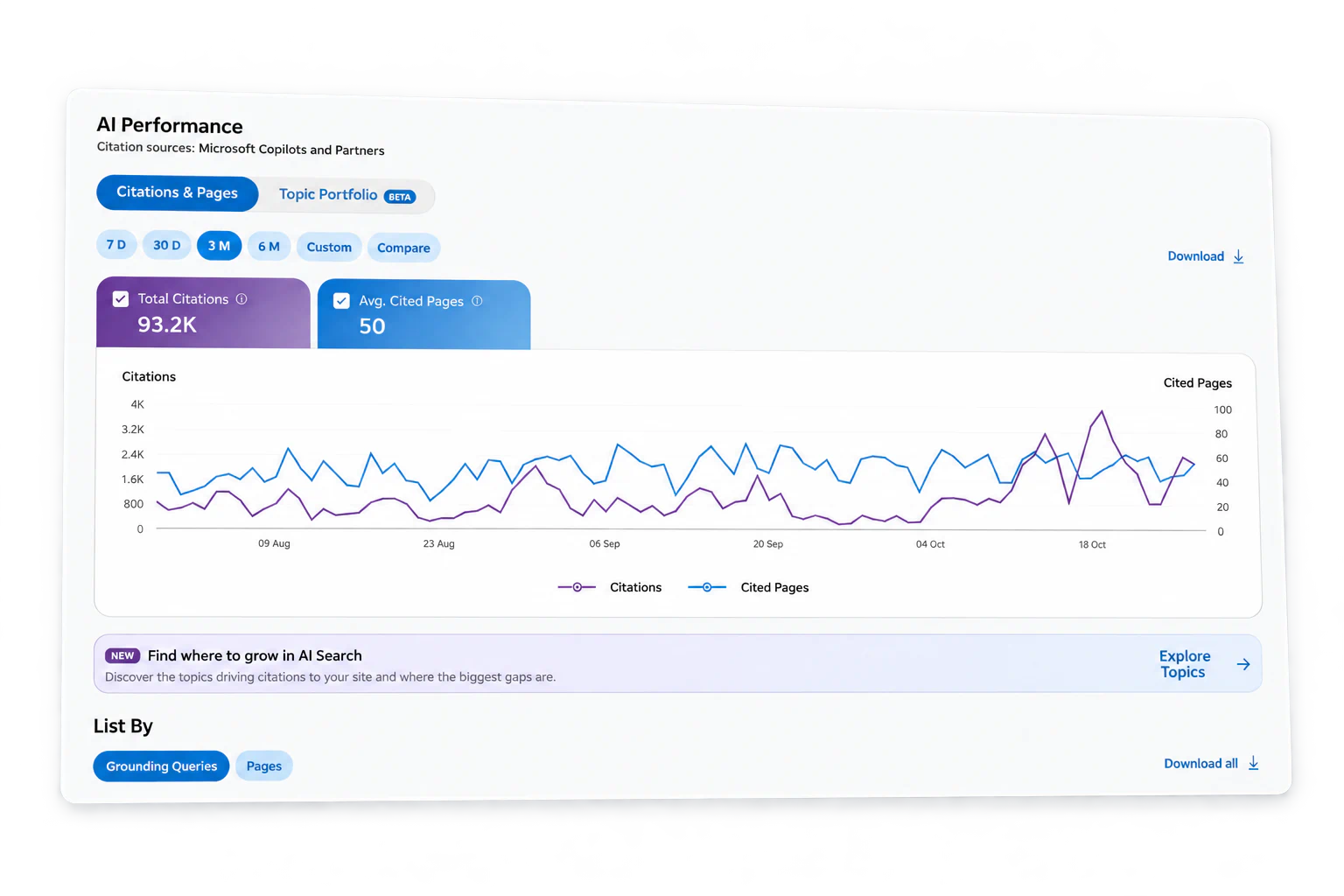
Its grounding queries are grouped phrases associated with information AI retrieved. They summarise sampled citation activity across answers, rather than showing individual customers’ conversations.
Select a grounding query to investigate the pages cited for it, or select a page to explore its associated queries.
For an organisation offering energy-efficiency support in Warwickshire, relevant themes might include insulation, eligibility and local funding.
The Topics and Intents preview features organise this activity by subject and purpose. Where sufficient data is available, the Topics Portfolio beta also highlights queries where other websites appear and yours doesn’t.
Treat its figures and classifications as approximate planning signals. See Bing’s report documentation and its Topics Portfolio announcement.
Clarity’s citation dashboard shows citation activity and related query themes. Branded and non-branded labels help distinguish searches involving your business’s name from broader discovery.
Its Share of authority metric measures your domain’s share of citations within the query-and-day activity included in its calculation. It isn’t a measure of your share across all AI search.
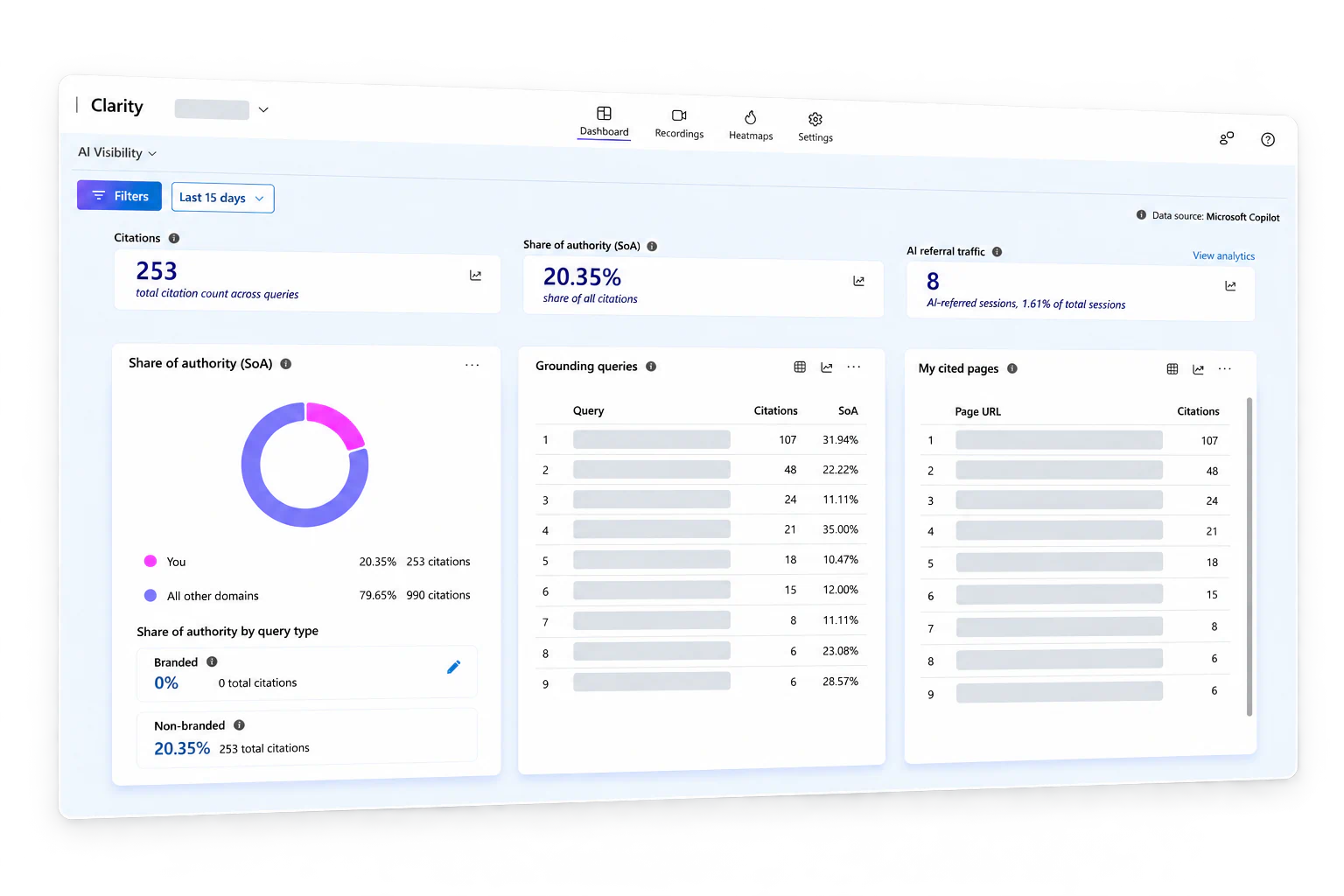
Topic Insights lets you define prompts within Clarity and examine generated answers, competing sources and content opportunities. Microsoft explains Topic Insights here.
Clarity also provides session recordings and heatmaps. Use them to investigate whether visitors from identifiable AI sources can find service details and complete an enquiry.
Someone arriving on a technical guide may still need pricing information, evidence of relevant experience and a clear route to contact you.
Report Bing and Clarity separately, and compare each tool’s figures over time.
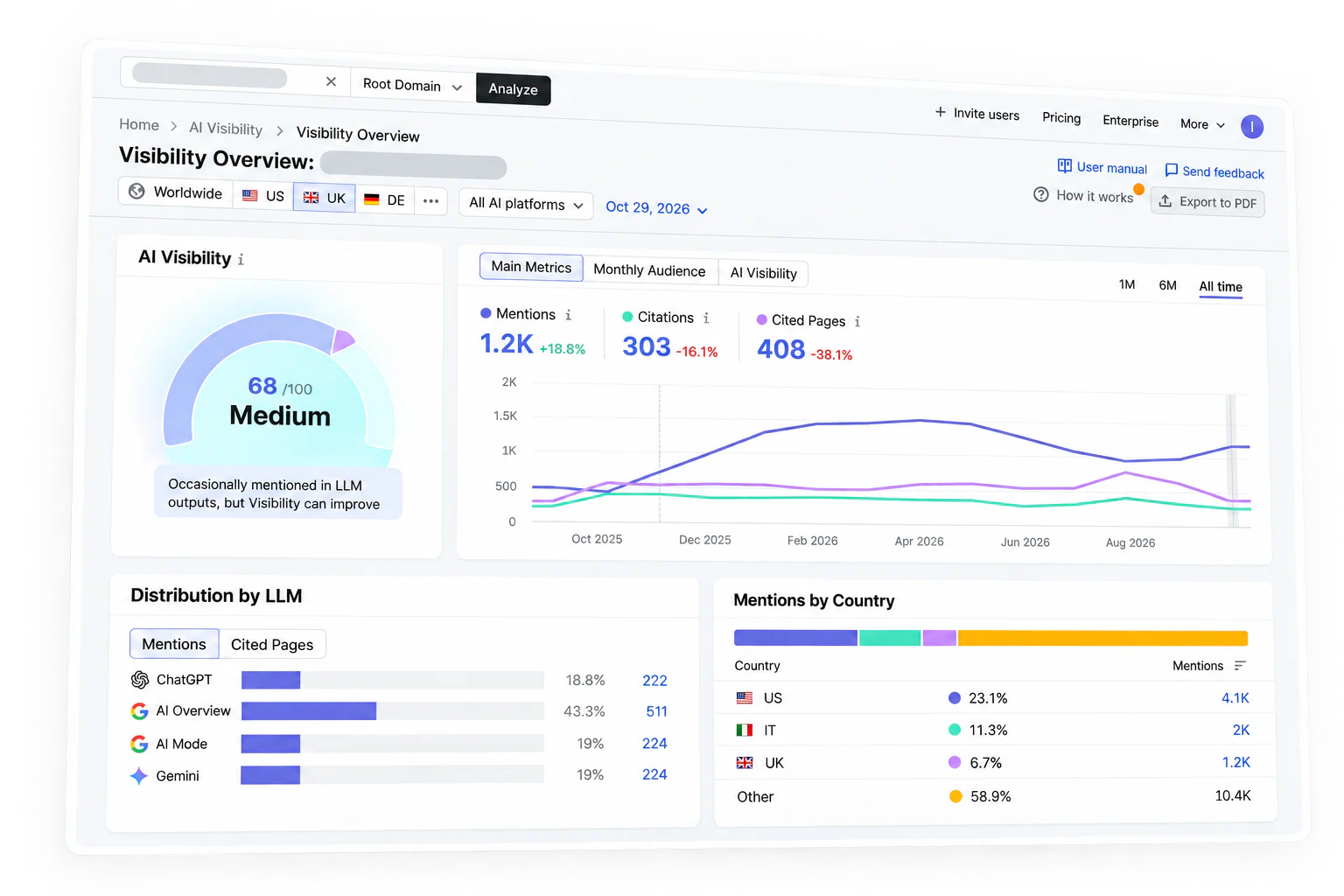
Semrush’s paid Prompt Tracking checks prompts you choose daily across ChatGPT Search, Google AI Mode and Gemini. It requires access to the AI Visibility Toolkit; allowances depend on your subscription.
Build your list from customer enquiries, Search Console data and themes found in Bing and Clarity. Include branded prompts and broader discovery prompts, such as:
To start, go to AI Visibility → Prompt Tracking and click Add new target. Choose your AI platform, set the location and language where available, then select Continue To Prompts. Enter one prompt per line or import an existing list, and click Start Tracking. Repeat for each platform you want to monitor.
Keep the wording and target markets consistent when comparing results. The scores reflect the prompts and platforms being tracked.
Once a month, review a consistent set of prompts across relevant AI search platforms. Our guide to preparing your business for AI search introduces the different platforms and the information your business should make available.
Run each prompt once per platform in a new conversation and save the answer text or a screenshot alongside your spreadsheet. Treat this as a snapshot: use it to identify inaccuracies and issues worth investigating, and avoid interpreting one changed answer as proof that visibility has improved or declined.
For your most important prompts, consider repeating the check in a new conversation to see how consistent the answers are.
Keep a spreadsheet recording:
Keep the wording, language, search settings and signed-in or signed-out approach consistent between monthly reviews. Where available, disable memory and personalisation for the checks.
Compare your results with businesses competing for the same customers. If another company appears regularly, investigate its content and the sources cited for ideas worth exploring.
For overseas markets, record where you are searching from as well as the location in your prompt. A VPN can help test another country’s network location, although device location and other signals can still reveal where you are. Record whether you used one.
Record significant website changes and compare subsequent monthly results with your baseline. Look for patterns in business appearances, recommendation order and links to your own website across several reviews. A change in the results alone won’t establish what caused it.
Check practical details carefully. If AI says your clinic offers Sunday appointments and it doesn’t, investigate the cited information and correct anything you control before your reception team has to explain the difference.
Bring the findings into a monthly report, using Looker Studio where appropriate. Show mentions, citations, identifiable visits and enquiries or sales separately.
Include actual numbers alongside percentage changes, compare similar periods and account for seasonality. A rise from one enquiry to two needs that context.
For tracked prompts, record the platforms, markets and settings used. Keep results involving your business’s name separate from broader discovery prompts.
Then agree specific actions. A frequently cited technical guide may need better links to your services. Missing recommendations for commercial refurbishments may prompt a review of your sector pages and project case studies.
Where possible, follow enquiries through to qualified leads and customers. That helps distinguish growing visibility from useful commercial results.
For now, I’d combine several tools and compare their findings. A few more tabs open, admittedly, but a fuller picture of what’s happening.
Ask to see an example report. The agency should explain what it measures, where the information comes from and what it would change next.
Transparent reporting should show the prompts, platforms and periods being compared, alongside the visits and outcomes that can be identified. Be cautious of guaranteed AI rankings or reports built entirely around a few favourable screenshots.
Recommendations should relate to your business. They might include clearer service information, stronger case studies, accurate listings, genuine customer reviews, relevant third-party coverage or improvements to the enquiry journey.
At ADAO, our AI search optimisation services bring measurement together with technical, content and authority work.
Talk to the ADAO team about understanding your current visibility and deciding what to improve next.
Combine prompt tracking and manual checks with website analytics and citation reports. Record whether your business appears, which sources are linked, whether people visit your website and which identifiable visits lead to enquiries or sales.
A mention names your business. A citation references a source, usually with a link. AI can recommend your business while citing a directory, or cite your website without recommending your company. In this guide, website citations mean links to your own domain.
They provide retrieval phrases and related themes, rather than a log of individual customers’ conversations. Clarity’s Topic Insights also lets you test prompts you choose.
Yes, when the traffic source can be identified and enquiry tracking works correctly. It won’t identify every enquiry influenced by ChatGPT, particularly when someone returns later through another channel.
A monthly manual review is a practical starting point. Check important factual details again after changes to services, prices, locations or availability. Automated tools can collect results more frequently without requiring daily manual checks.
More Articles



In order to have the best experience, please update your browser. If you choose not to update, this website may not function as expected. Clicking the button below will help you to update your browser.
Update Your Browser Continue Without Updating